Monday, October 26, 2009

Celebrate the Release of Windows 7 at IDB Auditorium, Dhaka

Celebrate the release of Windows 7 in the biggest launch party ever!

Who can come: Anyone who uses a computer @ home/work.

Entry Fee: 50 BDT per person
Updated- No entry fee needed
(Seats Limited).

Date: Saturday, November 7, 2009

Time: 10:30am - 1:00pm

Location:

IDB Auditorium, IDB Bhaban
E/8-A Rokeya Sarani, Sher-E-Bangla Nagar
Dhaka, Bangladesh

To register visit: http://bd.merawindows.com

Windows 7 community members will be able to install evaluation copy of Windows 7 on the event. Guest are encouraged to come with their laptop.

Proposed Agenda:

Introduction to Windows 7 (Presentation)
Demonstrate Live Windows 7 (Live Demo)
Introduction to IE 8 (Presentation and Live)
Demonstrate Windows Live (Presentation)
Windows 7 installation on interested audience's laptop
Small Quiz and distribute small gifts to the participants/winners


Note: Seats are limited so register and confirm your participation. Do hurry!

Hope everybody will enjoy the party.

Sunday, October 25, 2009

I am going to Mars!!! Do you want to go?


Ha Ha Ha. This is very interesting. I am going to mars!!! Oops... Not me but my name. LOL. I have found in Nasa's website that they are asking name from people and the name will be included with others on a microchip on the Mars Science Laboratory rover heading to Mars in 2011! I’ve entered my information at Nasa's website and received a certificate of participation which you are seeing in the picture here. It can be viewable from their website here too. So I am going... Oops my name is going at least :). Do you want to go with me? then register your name in their website.

Hope we will enjoy the journey :D

Thursday, June 11, 2009

Why microsoft sharepoint is so popular and is going to be more popular in future?

Recently I have started working on sharepoint server 2007. There are many reasons to love this application. I wanted to share some of our findings regarding sharepoint. Hope it will help you to take the right decision.

Top Ten Reasons Behind the Popularity of Sharepoint

There are many reasons behind the popularity of Microsoft sharepoint server. All the details can be found in sharepoint official site . Also I have found some important discussion here too. However, according to my point of view, following are main 10 reasons behind the popularity of sharepoint server:

1. Very easy to use as collaboration platform as it needs browser to access the server
2. Instantly create sites from predefined template
3. Share documents and tracking them with role based security
4. Use as a easy project management tool( manage lists, todo, share files, etc)
5. Plug and play webparts
6. Integrate with microsoft most popular product microsoft office
7. Work from internet as well as intranet
8. Integrated task calendar with microsoft outlook. so accessible from outlook directly
9. Connect developer, manager and client in one platform
10. Document versioning and sharepoint designer support to open and edit sharepoint site

isn't it enough to be popular sharepoint :)

Sharepoint Installation

Sharepoint installation is very easy and straight forward. If anybody is interested then can follow the procedure below:

1. First of all download the WSS 3.0 from the following location- its good for beginner or you can buy MOOS2007(Microsoft Office Sharepoint Server 2007)

http://www.microsoft.com/downloads/details.aspx?FamilyId=D51730B5-48FC-4CA2-B454-8DC2CAF93951&displaylang=en

Maintain the following sequence in a windows 2003 server. If you don't have windows server 2003, you can try with virtual pc or vmware what I am doing now

2. Install IIS

3. Install .net framework 2.0/+

4. Configure server

5. Install WSS

At the final step of installation you will get the link of the server to access. Wish you will enjoy your time with sharepoint.

Happy programming!

Thursday, January 22, 2009

Make Understand IE6 About 'position:fixed'

Many times we need to use fixed position along with relative, static and absolute position in style sheet, specially in AJAX progress bar. Now question is what it does actually? To show the longer content of a web page, browser use scroll bar which can make your progress message out of the sight. Specially, while we update at the bottom of the ajax update panel, user might not notify about the waiting message or update message. We can easily fix the problem by using 'position: fixed' in CSS. But problem is IE6 or older version of IE, don't understand this. To make it understand on this particular style, we need to write a little javascript code in the CSS. Let see that simple code below:

.updateProgress

     {

       background-color:#CF4342;

       color:White;

       position: absolute;

       top: expression(0+((e=document.documentElement.scrollTop)?e:document.body.scrollTop)+'px');

       right: expression(0+((e=document.documentElement.scrollLeft)?e:document.body.scrollLeft)+'px');}

     }

Now for cross browser support let see the full code below:

<style type="text/css"> 

        .updateProgress

        {

            background-color: #CF4342;

            color: White;

            top: 0px;

            right: 0px;

            position: fixed;

        }

        .updateProgress img

        {

            vertical-align: middle;

            margin: 2px;

        }

    </style>

    <!--[if gte IE 5.5]>

    <![if lt IE 7]>

    <style type="text/css">

    .updateProgress

     {

       background-color:#CF4342;

       color:White;

       position: absolute;

       top: expression(0+((e=document.documentElement.scrollTop)?e:document.body.scrollTop)+'px');

       right: expression(0+((e=document.documentElement.scrollLeft)?e:document.body.scrollLeft)+'px');}

     }

    .updateProgress img {

       vertical-align:middle;

       margin:2px;

     }

    </style>

    <![endif]>

<![endif]-->


That’s all. Enjoy Programming!

Sunday, September 14, 2008

Document Security Over IIS Using Form Authentication

We all rely on asp.net authorization technique to protect our forms from anonymous access. But what about documents like pdf, images or other type of documents? By default, if anybody type the direct URL of a document in the browser’s address bar then IIS6 permit them to see the physical document without checking the authentication permission. Its a big threat for secured web-site. To solve the issue, we have to configure IIS such a way so that aspnet_isapi.dll take the control to show the document while request will come. Here is what it can be done:

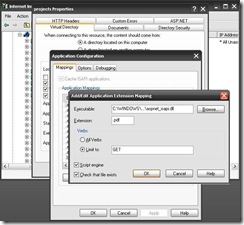
1. Right click on the virtual directory which need to be secured and select property. From the opened dialogue box select Virtual Directory tab and click on configuration button. Now add a new configuration with the following settings

Executable: aspnet_isapi.dll location

Extension: document extension (like .pdf)

Verbs: GET
clip_image001

2. Add Location path to web.config file

<location path="temp-pdf">

    <system.web>

      <authorization>

        <deny users="?" />

      </authorization>

    </system.web>

  </location>

That’s it. You are done. Now if you want that the document will be handle by custom code for extra security then you can add a entry in the http handler in the following way:

1. Add a entry to httphandlers section to handle the file type for extra security in web.config file


<httpHandlers>

      <add verb="*" path="*.pdf" type="PdfHandler" validate="false"/>

</httpHandlers>

2. And create a custom class to App_Code following way:

Public Class PdfHandler

    Implements IHttpHandler


    Public Sub New()

    End Sub

    Public Sub ProcessRequest(ByVal context As HttpContext) Implements IHttpHandler.ProcessRequest

        Dim path As String = context.Request.PhysicalPath

        Dim name As String = path.Split("\"c)(path.Split("\"c).Length - 1)

        If Not String.IsNullOrEmpty(path) AndAlso path.ToLower().EndsWith(".pdf") Then

            context.Response.ClearHeaders()

            context.Response.ClearContent()

            context.Response.Clear()


            context.Response.Charset = Nothing

            context.Response.ContentType = "application/pdf"

            context.Response.AddHeader("Content-Type", "application/pdf")

            context.Response.AppendHeader("Content-Disposition", String.Format("inline;filename={0}", name))

            context.Response.WriteFile(path)

        Else

            Throw New FileNotFoundException("The page requested is invalid", path)

        End If

    End Sub

    Public ReadOnly Property IsReusable() As Boolean Implements IHttpHandler.IsReusable

        Get

            Return False

        End Get

    End Property

End Class


Note: You can replace the above code with your custom requirements.

Happy Programming!

Advantage and Disadvantage of Using XML and XSLT

After getting request from few of my blog readers, I am here to describe some major advantages and disadvantages of using XML and XSLT:

Advantages:

1. XSLT applies user defined transformations to an XML document and the output can be HTML, XML, or any other structured document. So it is easy to merge XML data into presentation.

2. XPath used by XSLT to locate elements/attribute within an XML document. So it is more convenient way to traverse an XML document rather than a traditional way, by using scripting language.

3. Being template based, XSLT is more resilient to changes in documents than low level DOM and SAX.

4. By separating data (XML document) from the presentation (XSLT), it is very easy to change the output format in any time easily without touching the code-behind.

5. Using XML and XSLT, the application UI script will look clean and will be easier to maintain

6. XSLT templates are based on XPath pattern which is very powerful in terms of performance to process the XML document

7. XSLT can be used as a validation language as it uses tree-pattern-matching approach.

8. XML is platform independent.

9. XML has column flexibility, so it can be update easily rather than a traditional table-row-column approach

10. XML Supports Unicode

11. XML has self-documenting capability

Disadvantages:

1. It is difficult to implement complicate business rules in XSLT

2. Changing variable value in looping, is difficult in XSLT

3. Using XSLT have performance penalty in some cases as its engine don’t optimize code by using caching technique like traditional compiler.

4. XML encourage non-relational data structure(de-normalized)


Happy Programming!

Wednesday, August 27, 2008

Browser Back Button Security

Sometimes, we have to work for secured project where even  browser cache can be a problematic things. Normally in ASP.Net web application, every page is cached by the web browser. So, anybody can thief potential information from the web pages using back button if the user forget to close the browser after sign-out. Sometimes its create a embarrassing situation. But we can kill the cache on the spot easily by adding the following two lines in every page’s PageLoad event which will disable the browser back button functionality in ASP.Net application :

Response.Cache.SetCacheability(HttpCacheability.NoCache);
Response.Cache.SetAllowResponseInBrowserHistory(false);

The above two line is enough to say the browser not to cache the page. However, you can also add the following three line for better performance

Response.CacheControl = "NO-CACHE";
Response.AddHeader("Pragma", "no-cache");
Response.Expires = -1;

which is the equivalent of the following meta tag

<meta http-equiv="Pragma" content="no-cache">
<meta http-equiv="Expires" content="-1">
<meta http-equiv="CACHE-CONTROL" content="NO-CACHE">

Also don’t forget to set authorization in configuration file. So that application will force the user to login page:


<location path="admin">
    <system.web>
      <authorization>
        <deny users="?"/>
        <allow users="*"/>
      </authorization>
    </system.web>
  </location>

Enjoy Programming!